Every department seems to be automating something these days. Finance teams use bots to flag invoice mismatches before anyone opens a spreadsheet. Sales teams use AI to score leads before a rep ever picks up the phone. So it’s a little strange that physical mail still lands on someone’s desk to be sorted by hand, scanned one page at a time, and routed based on whoever remembers which department handles what.
That gap is starting to bother many operations leaders across industries like healthcare, legal, and finance. A single misrouted invoice can hold up a vendor payment for days. A contract that sits in a shared inbox instead of going straight to legal can blow past a signing deadline nobody meant to miss. And when mail handling depends on one or two people knowing the unwritten rules of where things go, the whole system breaks the moment they’re out sick or swamped.
This isn’t a mailroom problem anymore. It’s a workflow problem, and AI is well suited to solve it. Automating a digital mailroom workflow isn’t about adding more scanning; it’s about designing and implementing mailroom processes that classify, route, and act on mail as soon as it arrives, so nothing sits waiting for someone to notice it. The implementation process typically involves an initial assessment, system integration, staff training, evaluation of digital mailroom services, and a phased rollout to automate the most critical mailroom workflows.
What is a digital mailroom workflow?
A digital mailroom workflow is the set of steps a business follows to receive, digitize, classify, and route incoming mail, whether physical or electronic, without relying on a person to sort and hand-deliver it manually. Instead of a mailroom clerk sorting letters into cubbyholes, scanned documents move through software that reads them, tags them, and sends them to the right inbox, folder, or system. A true digital mailroom process integrates seamlessly with existing systems like ERP, EHR, or document management platforms, ensuring smooth adoption and minimal disruption to current workflows.
Traditional vs. Modern Digital Mailroom Workflow
The difference between the old way and the new way isn’t just speed — it’s how much manual judgment you remove from a process that used to depend on it.
| Aspect | Traditional Mailroom | Digital Mailroom Workflow |
|---|---|---|
| Mail intake | Physical sorting by hand | Centralized intake across mail, fax, email |
| Processing time | Hours to days | Minutes |
| Document routing | Manual delivery to desks | Automated routing based on content/rules |
| Data capture | Manual entry, error-prone | OCR/AI-based extraction |
| Searchability | Filing cabinets, physical archives | Indexed, searchable digital records |
| Remote access | None — mail is physically located | Available from anywhere |
| Compliance tracking | Paper trails, hard to audit | Digital audit logs, timestamps |
| Staffing needs | Dedicated clerks for sorting/delivery | Minimal oversight, exception handling only |
In a traditional setup, a piece of mail might sit in a bin until someone gets around to sorting it, then travel through interoffice mail, then land on a desk, sometimes the wrong one. In a modern digital mailroom process, that same document is scanned within hours of arrival, read by OCR software, classified as an invoice, claim form, or legal notice, and automatically routed to the right queue. The person who needs it sees it in their system before the physical original even reaches the mailroom cart.
Benefits of Digital Mailroom Workflow Automation
Automating a mailroom isn’t about replacing people for its own sake. It’s about giving decision-makers confidence in accuracy, reducing misrouted documents, and cutting delays; metrics that directly impact your bottom line.
Faster turnaround times
When mail routes itself based on content, there’s no lag between arrival and delivery. A claims document that used to take two days to reach an adjuster can reach them within the hour. That matters most in industries where delays carry real cost missed SLAs, late payments, and compliance deadlines that trigger penalties if missed by even a day. A law firm that used to lose half a day just getting a filed motion from the mailroom to the right attorney’s desk now has it in their inbox before lunch, with the deadline already flagged.
Reduced manual errors
People misread handwriting, misfile documents, and occasionally lose things. It happens even with careful staff; it’s the nature of repetitive manual work. OCR and rules-based routing don’t get tired at 4 PM on a Friday or rush through the last stack before a holiday weekend. Error rates in data entry and document classification drop sharply once software does the first pass, and the errors that do occur are usually flagged for review rather than slipping through silently.
Lower operational costs
Fewer people are needed to sort and deliver mail physically. Office space once used for mail bins, sorting tables, and filing cabinets can be repurposed for something that actually generates revenue. And digitized records reduce the ongoing cost of physical storage, off-site archiving, and document retrieval- no more paying a records company to pull a box from storage because someone needs a document from three years ago.
Better compliance and audit trails
Every document that moves through a digital mailroom workflow leaves a timestamped record. When it arrived, who it was routed to, when it was opened or actioned, and by whom. For regulated industries like healthcare, legal, and finance, this isn’t a nice-to-have. It’s often the difference between passing an audit smoothly and scrambling to reconstruct a paper trail afterward. Implementing robust security measures and compliance protocols in the digital mailroom keeps sensitive data protected and audit-ready, addressing industry-specific concerns.
Improved employee experience
Nobody enjoys sorting mail or chasing down a document that got misplaced three departments ago. Automating that work frees staff to handle exceptions and actual casework instead of shuffling paper. It also reduces a specific kind of frustration that’s hard to quantify but easy to notice: the employee who spends twenty minutes a day just figuring out where something landed.
Remote and hybrid work support
A digital mailroom doesn’t care where your team is sitting. Documents that used to require someone physically present in the office to retrieve are now accessible from a laptop anywhere with the right permissions. This became non-negotiable for many businesses once hybrid work stopped being optional; a claims adjuster working from home on a Friday shouldn’t have to wait until Monday to see a document that physically arrived on Thursday.
How to Automate Digital Mailroom Workflow
Getting from a paper-based process to an automated one isn’t a single step. It includes a sequence of decisions about intake, technology, and integration, and most organizations get better results moving through them in order rather than trying to automate everything at once.
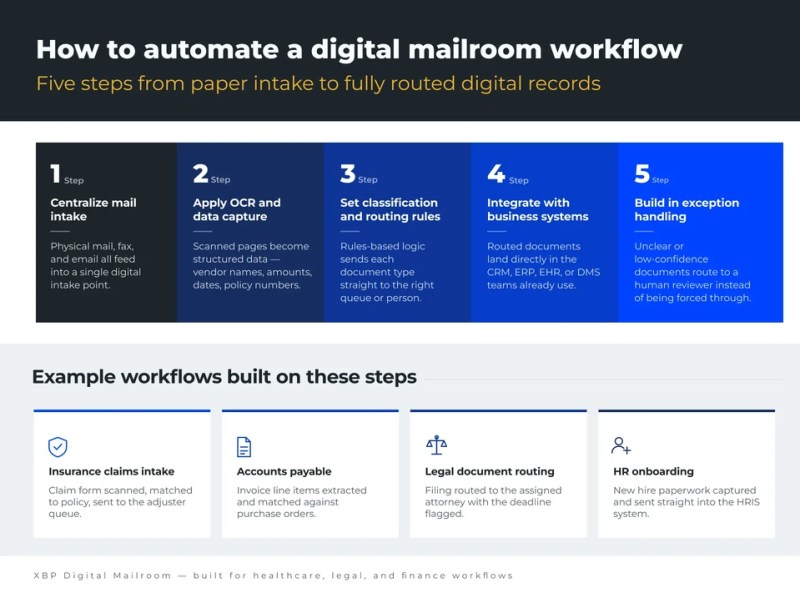
Step 1: Centralize mail intake
Before you can automate anything, all inbound channels need to feed into one system. That means physical mail, faxes, and emails all get scanned or routed into a single digital intake point rather than handled separately by different teams using different tools. Some businesses use a mail forwarding or scanning service for physical mail; others install high-speed scanners on-site and have staff feed incoming envelopes through each morning. Either way, the goal is one funnel, not five.
Step 2: Apply OCR and intelligent data capture
Once documents are digitized, OCR (optical character recognition) and, increasingly, AI-based data extraction tools read the content. This is where a scanned invoice becomes structured data- vendor name, amount, due date- rather than just an image of a page. Modern capture tools also go beyond basic OCR: they can recognize form layouts, extract data from tables, and handle handwritten fields with reasonable accuracy, which older OCR systems struggled with.
Step 3: Set up classification and routing rules
This is the core of the automation. Rules-based logic and, increasingly, machine learning models trained on historical document patterns determine what kind of document has come in and where it should go. A medical claim form routes to claims processing. A subpoena routes to legal and is flagged as urgent because of its deadline. An invoice routes to accounts payable for three-way matching against a purchase order. The more consistent your incoming document types are, the more confidently the system can classify them without human input.
Step 4: Integrate with existing business systems
Automation only pays off if the routed documents land where people actually work. That means connecting the digital mailroom to your CRM, ERP, EHR, or document management system, so a scanned document doesn’t just sit in a separate portal that nobody checks. This integration step is often where projects stall; it’s less glamorous than the scanning and OCR piece, but it determines whether the automation gets used day to day or quietly ignored.
Step 5: Build in exception handling
Not everything will classify cleanly. Illegible handwriting, unusual document formats, or ambiguous routing cases need a fallback, usually a human reviewer who handles exceptions the system can’t confidently resolve on its own. A good automated digital mailroom process doesn’t try to eliminate human review; it narrows the scope of what needs it, so your team reviews the 5% of documents that genuinely need judgment instead of all of them. If you’re looking for a complete guide to this type of automation, refer to this enterprise digital mailroom guide, which covers everything from intake automation to compliance-ready document management.
Key workflows that can be automated in a digital mailroom
Not every piece of incoming mail needs the same treatment, and a well-designed digital mailroom process usually handles several distinct workflows in parallel:
Invoice and accounts payable processing
Capturing vendor invoices, extracting line items, and routing them into an AP system for approval
Claims intake
For insurance and healthcare, scanning claim forms and supporting documents and routing them to adjusters or case managers
Legal document handling
Court notices, subpoenas, and contracts that need to reach the right attorney or paralegal within tight deadlines. We recently helped a major Los Angeles law firm with three US offices that faced a critical breaking point during COVID-19 lockdowns. We built custom workflows for their legal documents that maintain strict chain-of-custody and security standards. It’s a good example of what a compressed, focused automation rollout can look like when the need is urgent worth a full read if legal document routing is your bottleneck too. You can read the law firm document-routing case study here.
Customer correspondence
General inquiries, complaints, or account changes that need to be logged and routed to customer service teams
HR and payroll documents
New hire paperwork, benefits forms, and employment verification requests
Check and payment processing
Remittances and payments that need to be captured and reconciled quickly.
Compliance and regulatory mail
Notices from government agencies or regulators that carry firm response deadlines
XBP Digital Mailroom: Built for Healthcare, Legal, and Finance
Some industries can’t afford a one-size-fits-all mailroom tool. A healthcare provider dealing with PHI has different compliance requirements than a law firm managing case deadlines or a finance team processing high volumes of invoices. XBP’s digital mailroom solutions are built around that reality, with workflows configured specifically for these regulated environments rather than a generic scan-and-route setup.
For healthcare organizations, that means secure handling of patient records and claims data with HIPAA-aligned processes. For legal teams, it means deadline-sensitive routing so nothing tied to a court date slips through. For finance and insurance operations, it means high-volume invoice and claims processing with the data extraction accuracy needed to keep AP and claims teams moving without manual re-entry.
What sets a highly automated setup like this apart isn’t just scanning and OCR; most vendors offer that. It’s the depth of classification logic, the quality of system integrations, and the audit trail that regulated industries need to stay compliant while moving faster than a paper-based process ever allowed.
That combination is deep classification logic, real system integrations, and audit trails built for regulated industries, positioning XBP well for healthcare, legal, and finance organizations. Most vendors can scan a document and run OCR. Fewer can guarantee HIPAA-aligned handling of patient data, deadline-aware routing for legal filings, and the extraction accuracy finance teams need at high invoice volumes, all inside one platform. That’s the gap XBP is built to close, and it’s why organizations in these industries tend to outgrow generic scan-and-route tools fairly quickly.
Conclusion
A digital mailroom workflow isn’t a single piece of software; it’s a redesign of how information enters your organization and reaches the people who need it. Get the intake, classification, and routing right, and documents move in minutes instead of days, errors drop, and your team spends less time on paper handling and more time on the work that actually requires their judgment. The industries with the most to gain- healthcare, legal, and finance are also the ones where delays and errors carry the highest cost, which is why purpose-built automation matters more than a generic scanning tool. GET A CONSULTATION from our digital mailroom subject matter expert to see how XBP can map this workflow to your own mailroom, tailored to your industry’s compliance and volume needs.
If your mailroom process still depends on someone manually sorting and walking documents across the office, it’s worth a conversation. Connect with us to see how XBP can automate your digital mailroom workflow from intake to resolution.
